Place to download free full versions of the latest software
and audio samples for free.
Homepage » SoftwareX » ReFX Nexus 5 v5.3.24 for Windows
Download ReFX Nexus 5 v5.3.24 for Windows

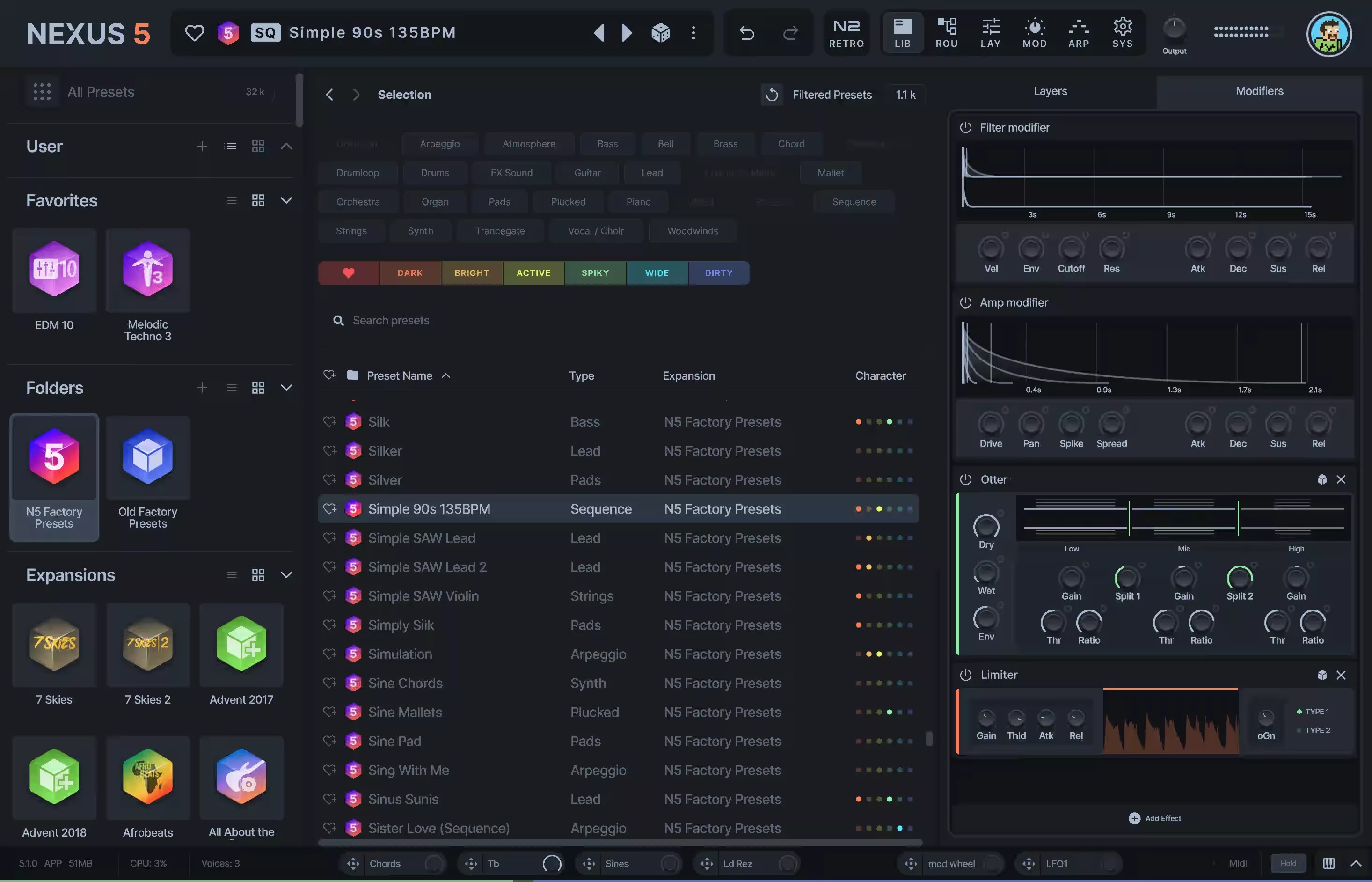
Experience a synthesizer that truly does it all. Packed with cutting-edge features and unmatched versatility, NEXUS5 is your gateway to limitless creativity.

Introducing The Ultimate Super Synth

  • Experience a synthesizer that truly does it all. Packed with cutting-edge features and unmatched versatility, NEXUS5 is your gateway to limitless creativity.
  • Unparalleled Sampling Power: Seamlessly import single samples, multi-samples, or entire libraries. Automatic slicing and looping for effortless workflow.
  • 8 Advanced Generators: Explore endless possibilities with Virtual Analog, Sampler, Wavetable, Time Stretcher, Retro Sampler, Grain, Cloud, and FM synthesis.
  • Studio-Grade Effects: Dozens of effects, including the new Bucket Brigade Delay, Particle Reverb, Vowel Filter, Rotary, Pusher, and more, to add depth and character to your sound.
  • And So Much More! The perfect blend of power, precision, and user-friendliness, making it ideal for producers at any level.

Open architecture

  • Design your own presets from scratch.
  • Load your own samples, create your own routings, build your own expansions. Use the built-in sample editor; complete with slicer, loop and crossfade options.
  • Alternatively and for super-quick results, load one of the thousands of presets available for NEXUS5 and make tweaks to suit your needs.
  • The only limit is your imagination!

New Factory Content

  • Updated to impress, NEXUS5 comes with more than 1,100 brand-new factory presets that catapult your productions to the next level!
  • Of course, all factory content from previous NEXUS versions is included as well, bringing the total content included with the standard edition of NEXUS5 to more than 5,300 presets!
  • All modern genres are covered: EDM, Melodic Techno, House, Vintage Synths, Hip Hop, Lo-fi, Retrowave, Cyberpunk, Drum and Bass, Trance, and more!

ReFX Nexus 5 v5.3.24 for Windows

Download ReFX Nexus 5 v5.3.24 for Windows

reFX Nexus v5.3.24 Update WIN-VR.rar
22.5 MB | Alternative links | Pass: www.4download.net
DOWNLOAD NOW
Nexus 5 Factory Content Library.rar
10.2 GB | Alternative links | Pass: www.4download.net
DOWNLOAD NOW
Download Previous version Get Your Free Temporary Email Address at Fake MailZ

Comments 34

Respect yourself and others!


  1. Marcello
    Marcello
    Yesterday at 16:20
    I can not find the factory content, my nexus is empty
    1. pika
      pika
      8 hours above
      did u download the 10gb file?
  2. Brian Mwiinga
    Brian Mwiinga
    Yesterday at 03:45
    What is the password for winrar? I am unable to access the folder.
  3. nas
    nas
    27 November 2025 17:21
    please help me with electra x
  4. Soykilluax
    Soykilluax
    26 November 2025 05:11
    THE SOLUTION FOR THE LIBRARY ISSUE
    https://www.youtube.com/watch?v=0Htxw2rkRXw

    Things to consider:

    1. Confirm the installation path you selected when installing the program. Make sure it matches the one shown in the video tutorial.

    2. Check the file named Settings.json (located inside the NEXUS folder). Verify that it contains the correct library path.
    It should look like this:
    "library_folder": "C:\\Users\\Public\\Documents\\reFX\\NEXUS library",
    If it doesn’t, rewrite that line exactly as shown.

    3. If the library is still empty after following all the steps, uninstall the program from Windows and reinstall it. That solved the issue for me. :)
  5. biz
    biz
    26 November 2025 04:36
    bonjour jai instaler nexus 5 comme il fallais mais je ne sais pas coment metre les dossier library pour les voire sur nexus
  6. John
    John
    22 November 2025 12:52
    It says that it doesn't support my version of windows. I got windows 11??
  7. Atti
    Atti
    21 November 2025 13:26
    We've got a problem over here with installing the libraries, help would be appreciated! I copied "Nexus 5 Content" to C:\Users\Public\Documents\reFX\NEXUS but still nothing
    1. Atti
      Atti
      21 November 2025 13:44
      So I solved it, basically all you have to do is uninstall nexus, reinstall it BUT select "Clean Install" because it will install all default files including the settings.json which is what we need, otherwise it wont appear with the "Update Only" install

      Click on settings.json and look for "library_folder": "some file path"

      Copy Nexus 5 Content's path where do u have it installed mine was "E:\Nexus 5 Factory Content Library\Nexus 5 Content" but u will have to copy yours

      Paste the path between the two " "s after "library_folder": and make sure you put "\\" in between the folders not just "\" otherwise it wont work

      like this "library_folder": "E:\\Nexus 5 Factory Content Library\\Nexus 5 Content" and NOT "library_folder": "E:\Nexus 5 Factory Content Library\Nexus 5 Content"
      1. Atti
        Atti
        21 November 2025 13:50
        path for settings.json: C:\Users\Public\Documents\reFX\NEXUS
      2. Ira
        Ira
        25 November 2025 01:38
        ty bruh u got it working for me. i appreciate it i was trying to get it to work for a long time. appreciate u. god bless ur soul.
  8. Jayz
    Jayz
    18 November 2025 22:36
    It's saying to activate Nexus. Did I do something wrong? Im not sure how to place the library files and I just put it in the user presets in "C:\Users\Public\Documents\reFX\NEXUS library". I replaced some files that the document told me to do. I don't know what to do now. Please help.
    1. Jayz
      Jayz
      18 November 2025 22:40
      let me add another thing. I dragged the csv file and svg file that came with the Nexus Factory Content Library into "C:\Users\Public\Documents\reFX\NEXUS tags.csv" and "C:\Users\USERNAME\AppData\Roaming\reFX\cloud\cache\images N5_Factory_Presets.svg" like how the document told me too. But is it supposed to be the other way around?
      1. Atti
        Atti
        21 November 2025 13:23
        put tags.csv in C:\Users\Public\Documents\reFX\NEXUS

        put N5_Factory_Presets.svg in C:\Users\USERNAME OF YOUR PC\AppData\Roaming\reFX\cloud\cache\images
    2. Axel
      Axel
      18 November 2025 23:58
      I'm stuck in nexus activation stage, too.
      I'm considering using Nexus 2 which have no library, activate problems, and adding Nexus 5 expansions to it.
    3. KayR Beatz
      KayR Beatz
      20 November 2025 06:05
      Same Here,It Wants An Email Account and Password now to open Nexus5 Even Deleted it coz It Messed up All My Projects Which I used nexus 2
  9. Big Winz
    Big Winz
    18 November 2025 02:17
    I tried to open the reFX Nexus v5.3.24 Update WIN-VR.rar but everytime I enter the password it still saying "Incorrect password". Plz help me!!
    1. Atti
      Atti
      21 November 2025 13:24
      password is www.4download.net
  10. Axel
    Axel
    17 November 2025 20:47
    I was dealing with nexus library problem. But I overcome it now. Then, It's asking me again for PASSWORD to activate Nexus. please help me??
    1. hh
      hh
      18 November 2025 01:25
      hi how did you fix the library problem im also getting that pop up
      1. Axel
        Axel
        18 November 2025 05:30
        What I did was change the folder at C:/users/public documents/reFX/ from 'nexus' to 'NEXUS library'. I then ensured that all the original library files were correctly moved into this newly renamed folder. But I'm not sure if this has truly fixed the library problem.
        1. Atti
          Atti
          21 November 2025 13:26
          Got it solved? Same problem over here
        2. Atti
          Atti
          21 November 2025 13:45
          So I solved it, basically all you have to do is uninstall nexus, reinstall it BUT select "Clean Install" because it will install all default files including the settings.json which is what we need, otherwise it wont appear with the "Update Only" install

          Click on settings.json and look for "library_folder": "some file path"

          Copy Nexus 5 Content's path where do u have it installed mine was "E:\Nexus 5 Factory Content Library\Nexus 5 Content" but u will have to copy yours

          Paste the path between the two " "s after "library_folder": and make sure you put "\\" in between the folders not just "\" otherwise it wont work

          like this "library_folder": "E:\\Nexus 5 Factory Content Library\\Nexus 5 Content" and NOT "library_folder": "E:\Nexus 5 Factory Content Library\Nexus 5 Content"
          Reply
  11. yk
    yk
    17 November 2025 09:33
    Can you please properly tell me the process to install.
  12. nld
    nld
    16 November 2025 23:58
    wat is the password
    1. TeoLe
      TeoLe
      17 November 2025 16:31
      are your eyes blind
    2. Atti
      Atti
      21 November 2025 13:52
      www.4download.net its always at the top of the page btw
  13. krishna dj remix
    krishna dj remix
    16 November 2025 19:02
    Sonic Atlas Expansions
    1. Mawada
      Mawada
      17 November 2025 01:22
      Hi, I have the full expansion pack DM me on Whatsapp+256779323874 if you need it
  14. KanyeSouth
    KanyeSouth
    16 November 2025 09:12
    What the difference than before?
    1. NotaJewszei
      NotaJewszei
      16 November 2025 16:15
      Nothing.

      New changes:

      - Always show mute/solo buttons on layer header.
      - Show mute/solo buttons on osc header until there are 34 oscs per layer.
      1. Kanye South
        Kanye South
        16 November 2025 18:45
        Thx for the reply, so there's still missing sounds/presets here and there in this update?
  15. משה
    משה
    16 November 2025 04:50
    איפה אפשר להוריד את קבצי המפעל המקוריים שמגיעים עם נקסוס?
    1. slimegetem
      slimegetem
      25 November 2025 13:51
      hava nagila